Every post on this blog so far assumes a person in the loop: you ask, the assistant previews, you say yes. This one is for the other shape. An agent runtime that speaks MCP, OpenClaw among them, a custom MCP client you wrote, or a cron job that wakes up, decides something is worth saying and exits. Nobody is reading the receipt in real time.
Posteora's MCP server was written with a person at the other end, and the rules below are what make it safe to connect when there is not one. I will not describe any runtime's own features, because I have not verified them; what follows is what the server does, for every client alike.
The endpoint
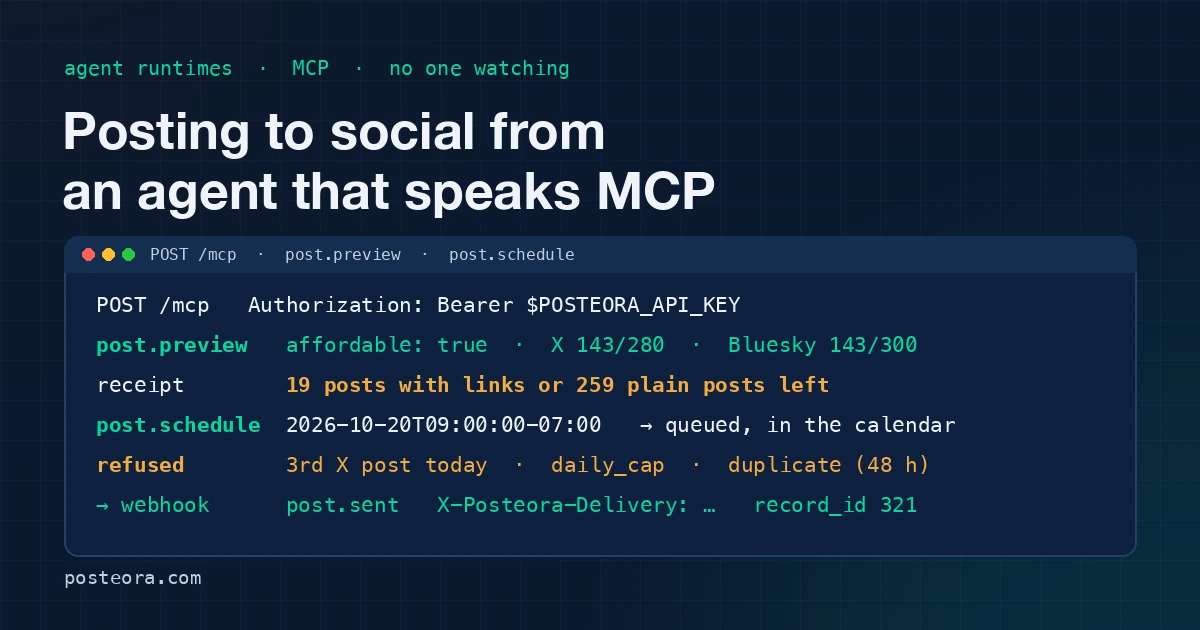
https://posteora.com/mcp, JSON-RPC 2.0 over HTTP POST. The server is stateless: no SSE channel, and a GET answers 405 saying so. initialize and ping are the only calls that work without a token; initialize returns the server's instructions, a paragraph your runtime should put where the agent reads it. Everything else needs an Authorization: Bearer header.
Two token kinds share that header:
- The account API key, from the Account page, with all scopes. The practical choice for a runtime without a browser. Regenerating the key signs out every client holding the old one, which is also how you revoke a runtime you no longer trust.
- An OAuth 2.1 access token from "Sign in with Posteora", scoped to what the sign-in granted:
accounts:read,posts:read,posts:write,voice:write,radar:read. A401points a client that implements the MCP authorization flow at the sign-in; Claude Code does that, a headless runtime usually cannot, which is why the API key exists.
The server accepts 120 requests a minute per token, the same bucket as the REST API. Call connection.label once with the runtime's name ("nightly-digest") so it shows by that name on your AI Assistants page.
Read the instructions your runtime is handed
The instructions string is the rhythm, in words: accounts.list first, post.preview before every post.publish or post.schedule, read the receipt to the user and wait for their yes. Two passages matter most for an unattended run:
Never queue or publish text the user has not seen.
generate a fresh idempotency_key per publish; at most 2 posts per day on X; never put links in X post text unless the user insists
These are instructions, not locks; the server cannot know whether a person saw the text. What it enforces on its own is the list below: the idempotency key, the X spacing when scheduling, the daily caps, the plan horizon and queue, the duplicate check and the X allowance. The instructed part is on you, and the simplest way to cover it is the next heading.
Preview, then schedule, and leave a window
For an unattended agent I recommend post.schedule over post.publish, with a time a few hours out, even when "now" would do. A queued post is visible: it sits in the Studio calendar, post.queue lists it, post.cancel removes it, and the post.scheduled webhook tells any other system it exists. That window is the review step the instructions ask for, moved from before the call to before the send. For a harder stop, pass draft: true and the post lands in Drafts for a person to approve in the Studio.
Whether the runtime writes the text or calls voice.write (1 AI credit) for a draft in the trained voice, call post.preview next, every time, even with nobody reading. It is free, creates nothing, and returns four fields the agent should act on: receipt (what the post draws on, characters against each network's limit, the X allowance after it), affordable, problem and next. Stop if affordable is false or problem is set, and write the receipt to the runtime's log for whoever reads it tomorrow. Skip it and the same refusals arrive one call later as a tool error, with nothing logged in plain words.
Log the schedule receipt too: it names the time in the offset you sent, and a time zone slip is the most common way a queued post goes wrong.
Idempotency keys
post.publish requires idempotency_key, a string of up to 64 characters that must be fresh for every distinct intent. A retry with the same key gets the original result back with replayed: true and nothing goes out again; a retry that arrives while the first call is still running is told to wait a few seconds and call again with the same key. Derive it from what makes the run unique (the job's run id, or a hash of the text and targets), never inside a retry loop, or the retry becomes a second post.
The caps that keep an agent from burning an account
An agent in a loop can post more in an hour than a person does in a month, and spam filters notice. These limits live on the server, and the preview shows each one before the send.
- Two X posts a day when scheduling. A third X post on the same local day is refused. A reply under your own post is exempt; it continues the post rather than adding one.
- Daily caps per network on Pro: X 5, LinkedIn 3, TikTok 3, YouTube 3, Bluesky 10, Mastodon 10, Pinterest 10, per UTC day. Free is 1 a day per network and 10 posts a month in all.
- Horizon and queue: 14 days ahead and 10 queued on Free, 90 days and 300 on Pro.
- Duplicate check: the same text to the same network within 48 hours is refused. An agent that re-runs after a crash cannot post yesterday's note again.
- The X allowance. X is the only network that charges Posteora per post, so every X send draws on a monthly allowance shown as posts, never as money: Pro includes about 20 posts with links or 260 plain posts a month, or a mix. Queued posts reserve their share. At 75% used or queued the receipt adds a warning with the exact meter; at 100% the preview refuses. Free accounts cannot put links in X posts at all.
A refusal is a tool error with a readable message and a code (horizon, queue_cap, daily_cap, monthly_cap, duplicate); log it, and do not retry a daily_cap until tomorrow.
Closing the loop
A runtime that sends and forgets never learns that LinkedIn refused the post. Two ways to find out:
- Webhooks. Register up to three HTTPS endpoints and receive
post.scheduled,post.sent,post.failed,post.cancelledandaccount.needs_reconnect, each signed withX-Posteora-Signatureand retried up to 4 attempts in all.post.sentcarries the live URL;post.failedcarries anerror_code. The signature check in Python and Node is in the webhooks post. - Polling.
post.statuswith therecord_idfrom the publish result, orGET /api/v1/activityfor one row per network per send, newest first.
And call accounts.list at the start of every run: needs_reconnect on a network means a post there will fail until a person reconnects on the website, so the agent should skip that target and say so.
Bring your own X key
If the agent uses up the allowance, Pro lets you connect your own X API key: register a pay-per-use app on X's developer portal with your own payment method, paste its OAuth 2.0 client id and secret on the Connections page, and connect X under it. Posts from that account bill X directly, draw nothing from the allowance, and the receipts say "your own X key, no allowance used". The daily caps still apply: the caps protect the account, the allowance protects the bill. Write to support@posteora.com for help with it; there is no extra charge from us.
What it costs
The free plan includes the MCP server and webhooks with 10 posts a month and no card. Pro is $19 a month, or $15 a month billed annually, with unlimited posts under fair use and the X allowance above; the pricing page has the table. If the runtime has a person at the other end after all, the Claude Code walkthrough is the two-minute version, and the receipts post explains each line of the receipt.